Why You Need to Research the Market Before Signing a Lease in Mexico
Let me tell you what I see happen all the time. Someone moves to Mexico, finds a nice apartment in a trendy neighborhood, and signs a lease. Three months later they discover they're paying 40% more than the neighborhood average—or worse, they realize an equally nice area two kilometers away costs half as much.
The rental market in Mexico is opaque. There's no MLS. Listings are scattered across Inmuebles24, Segundamano, Facebook groups, and word of mouth. Prices vary wildly even within the same colonia.
That's exactly why I built the rent price map. It aggregates real listing data across 500+ neighborhoods in Mexico's major cities. One glance tells you which areas match your budget—and which ones are overpriced.
Explore the CDMX Rent Map to see it in action.
- See average rent prices for 500+ neighborhoods across 10 major Mexican cities
- Color-coded dots instantly show expensive (red) vs affordable (green) areas
- Click any neighborhood to see detailed stats by bedroom count
- Filter by price to find all neighborhoods within your budget
- Share specific neighborhoods with roommates or relocation consultants
Cities Currently Covered by the Rent Map
The rent map covers the cities where most expats, digital nomads, and Mexican professionals are looking to rent.
In the dropdown at the top, you'll find: Ciudad de México (CDMX), Guadalajara, Monterrey, Puerto Vallarta, Los Cabos, Tijuana, Mérida, Cancún, Playa del Carmen, Tulum, and more to come.
Each city is broken down by municipality (alcaldía in CDMX) and then by individual colonia or neighborhood. Mexico City alone has over 200 neighborhoods mapped. View Guadalajara rent prices or View Monterrey rent prices to explore other metros.
Total neighborhoods mapped
500+
Cities covered
10 major metros
Data update frequency
Monthly
Reading the Map: What the Colors Mean
Each dot on the map represents a neighborhood with rent data. The color tells you how expensive it is at a glance.
Green dots are the most affordable neighborhoods—average rents under $8,000 MXN per month. These are often working-class colonias or areas further from city centers.
Yellow-green means $8,000–$12,000 MXN. Still affordable for most budgets.
Yellow indicates $12,000–$18,000 MXN. This is mid-range territory—decent neighborhoods with good amenities.
Orange means $18,000–$26,000 MXN. These are premium areas—think Condesa, Roma Norte, or San Pedro Garza García.
Red dots are the most expensive—$26,000+ MXN average. Places like Polanco, Lomas de Chapultepec, or beachfront zones in resort towns.
- Green: Under $8,000 MXN/month (most affordable)
- Yellow-green: $8,000–$12,000 MXN/month
- Yellow: $12,000–$18,000 MXN/month (mid-range)
- Orange: $18,000–$26,000 MXN/month (premium)
- Red: $26,000+ MXN/month (luxury/expat areas)
Navigating the Municipality View
When you first load the map, you'll see municipality-level dots. Each dot represents an entire municipality with its average rent calculated across all neighborhoods.
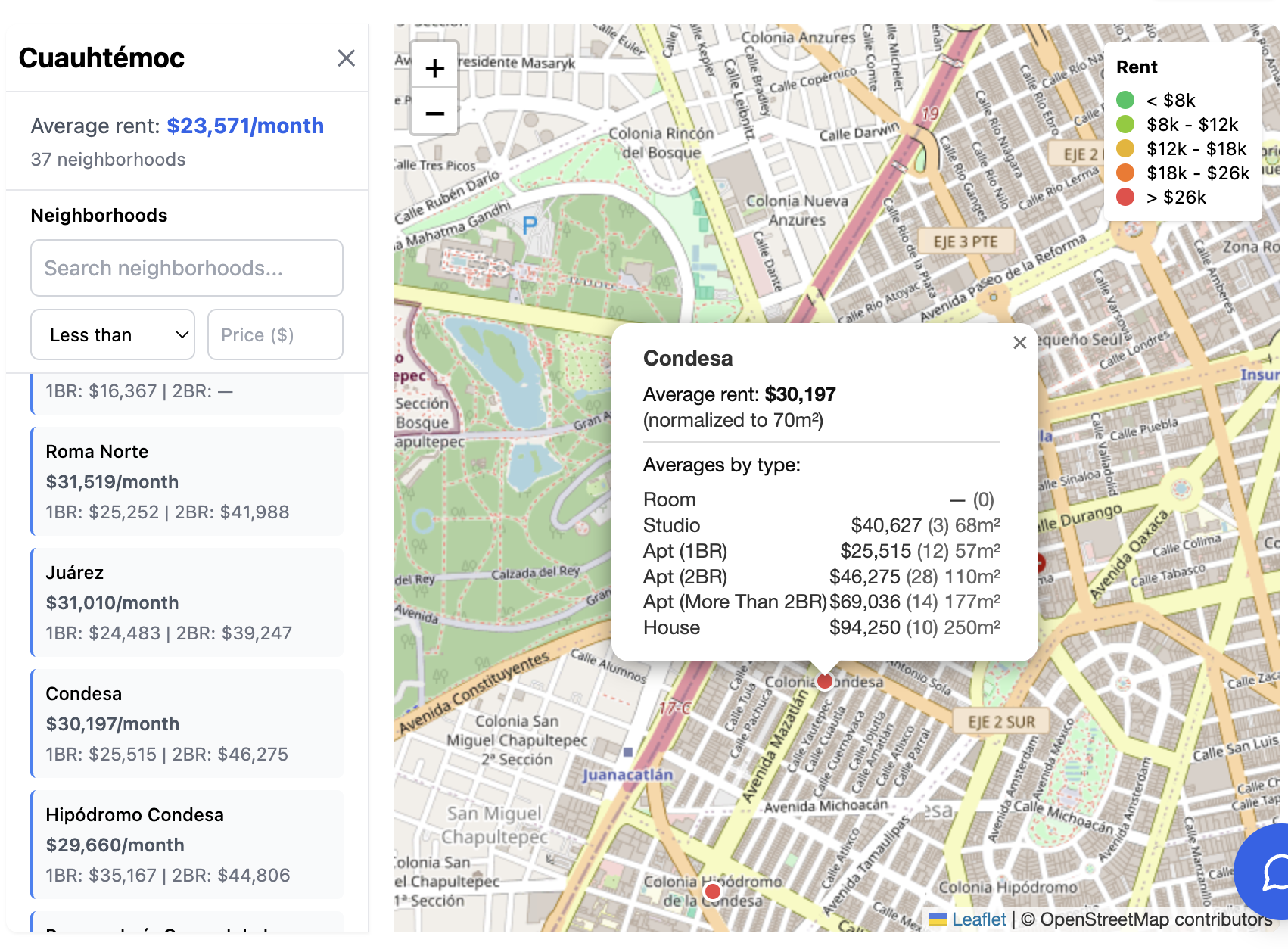
Click any municipality dot to zoom in and see individual neighborhoods. In Mexico City, for example, clicking on Cuauhtémoc reveals neighborhoods like Roma Norte, Roma Sur, Condesa, Juárez, and Centro Histórico.
This two-level navigation helps you quickly identify which municipalities match your budget before drilling into specific colonias.
The panel on the right shows the municipality name, average rent, and a ranked list of its neighborhoods from most to least expensive. This ranking is incredibly useful for finding hidden gems—the affordable colonias within otherwise pricey municipalities.
Drilling Into Neighborhood Details
Click on any neighborhood dot (or click a neighborhood name in the sidebar) to see detailed rental statistics.
You'll see the neighborhood average, plus breakdowns by bedroom count: studios, 1-bedroom, 2-bedroom, 3-bedroom, and 4+ bedroom apartments. This matters because a '2-bedroom average' of $18,000 could mean the neighborhood also has studios for $10,000.
The stats also show price per square meter ($/m²). This is the most accurate way to compare value across neighborhoods because apartment sizes vary so much. A $20,000/month apartment in one neighborhood might be 100m² while another charges the same for 60m².
For example, Roma Norte rent data shows detailed stats for one of CDMX's most popular expat neighborhoods.
Rental types tracked
Room, Studio, 1BR, 2BR, 2BR+, House
Key metric for comparison
Price per square meter ($/m²)
Using the Search and Filter Features
The map includes a search bar and price filter—use them.
If you know the neighborhood name, just type it. The search is fuzzy, so typing 'cond' will find Condesa, and 'roma' will find Roma Norte, Roma Sur, and other Roma variants.
The price filter is even more powerful. Set it to show only neighborhoods below a certain price threshold. If your budget is $15,000/month maximum, filter to that amount and instantly see which neighborhoods qualify.
Pro tip: I often set the filter to my maximum budget, then look for green or yellow dots within that filtered view. Those are the best-value neighborhoods that fit my requirements.
- Search by neighborhood name with fuzzy matching
- Filter by 'less than' or 'greater than' a specific price
- Combine search and filter to find affordable areas in a specific municipality
- Clear filters anytime using the X button
Sharing Neighborhoods with Others
Found a great neighborhood? You can share it directly.
When you click a neighborhood, the URL updates to include that specific location. Copy the URL from your browser, or click the Share button to copy a shareable link.
This is perfect for sending options to roommates, partners, or relocation specialists. Instead of describing 'that neighborhood near the park in Cuauhtémoc,' you send a direct link that opens the map zoomed to that exact colonia with all its stats visible.
The share links include the city, municipality, and neighborhood parameters—so recipients see exactly what you saw.
Case Study: Finding a 2-Bedroom Under $20,000 in Mexico City
Let me walk you through a real search scenario.
You want a 2-bedroom apartment in Mexico City for under $20,000 MXN per month. You want a decent neighborhood—safe, with cafes and restaurants nearby—but you don't need to be in the absolute trendiest spot.
Step 1: Select Ciudad de México from the city dropdown. The map shows all CDMX municipalities.
Step 2: I immediately rule out Miguel Hidalgo—that's Polanco territory, way over budget. Benito Juárez is borderline—some neighborhoods might work.
Step 3: I click on Cuauhtémoc. The sidebar shows neighborhoods ranked by price. Condesa and Roma Norte are at the top—too expensive. But scroll down and you'll find Juárez, San Rafael, and Santa María la Ribera in the $17,000–$25,000 range.
Step 4: I click San Rafael to check 2-bedroom prices specifically. If the 2BR average is under $20,000, I've found a winner.
This whole process takes about 3 minutes. Without the map, you'd spend hours checking individual listings across multiple websites.
Create a free account to unlock this guide
Create a complimentary PropTrenz account to unlock premium due diligence guides.
Get Started
Create Account
Already Have Account